Feasibility & Pricing
— Internal Decision Platform
As product design lead on a zero-to-one initiative, I designed an internal platform for project managers to consolidate inputs from Sales, Operations, and Research, assess study feasibility, and prepare a pricing estimate.

Context
Inside the healthcare
research ecosystem.
Pharmaceutical companies rely on research agencies to understand physicians' perspectives on treatments and medical products. These agencies design the studies but depend on specialized platforms to recruit qualified physicians and run surveys.
Research platforms provide the physician panels and survey infrastructure that make these studies possible — generating a continuous flow of projects that must be evaluated for feasibility and pricing before they can be proposed to clients.

Workflow
One request, three teams,
and a wall of spreadsheets.
Sales, Operations, and Research contributed the scope, availability data, and survey requirements for each request. Project managers needed to bring those inputs together to assess whether the study was viable and prepare its estimate.
Project information and calculations were spread across spreadsheets and Salesforce. Project managers needed to consolidate the inputs, review feasibility, and then estimate pricing without losing the context behind each decision.

Pain Points
Decisions that were
slow, opaque, and inconsistent.
Critical feasibility and pricing logic were scattered across multiple spreadsheets. Calculations were difficult to review, validate, or explain. Knowledge depended heavily on individual experience — and small input changes could significantly impact the project outcome.
The result: feasibility and pricing decisions were inconsistent and slow, making it hard for teams to respond quickly to client requests.
It was turning scattered logic into a shared, reviewable source of truth.
Strategy
Centralize the logic.
Then guide the decision.
I organized the platform around the project manager’s decision path: define the request and assess feasibility, configure the bid, and review the estimate. Inputs from Sales, Operations, and Research become part of one connected workflow.
Each step would build on the previous one, surfacing only what mattered for that decision and exposing the data behind it on demand.

The Workflow
From scattered inputs
to a guided evaluation.
Sales, Operations, and Research provide the project inputs. Project managers use the platform in three stages: define the request and assess feasibility, configure the bid, and review the estimate.
- 01
Define Request &
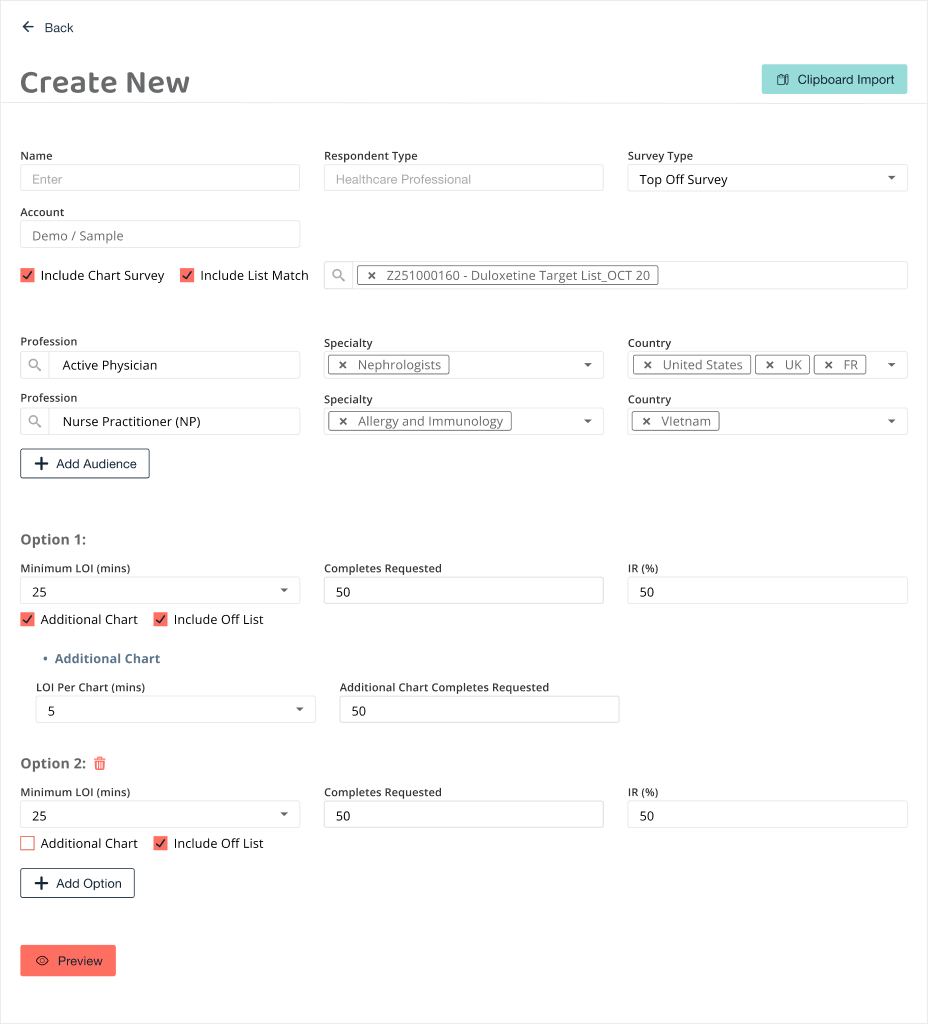
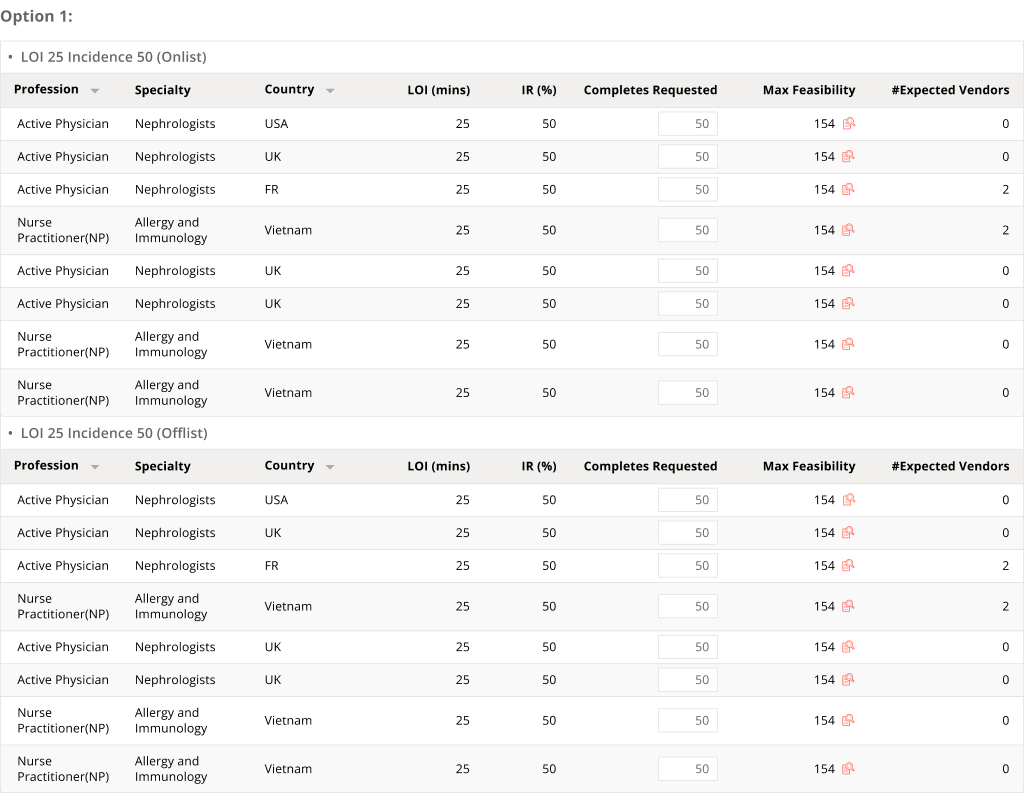
Assess FeasibilityConsolidate study requirements and review availability before proceeding to pricing.
- 02
Configure
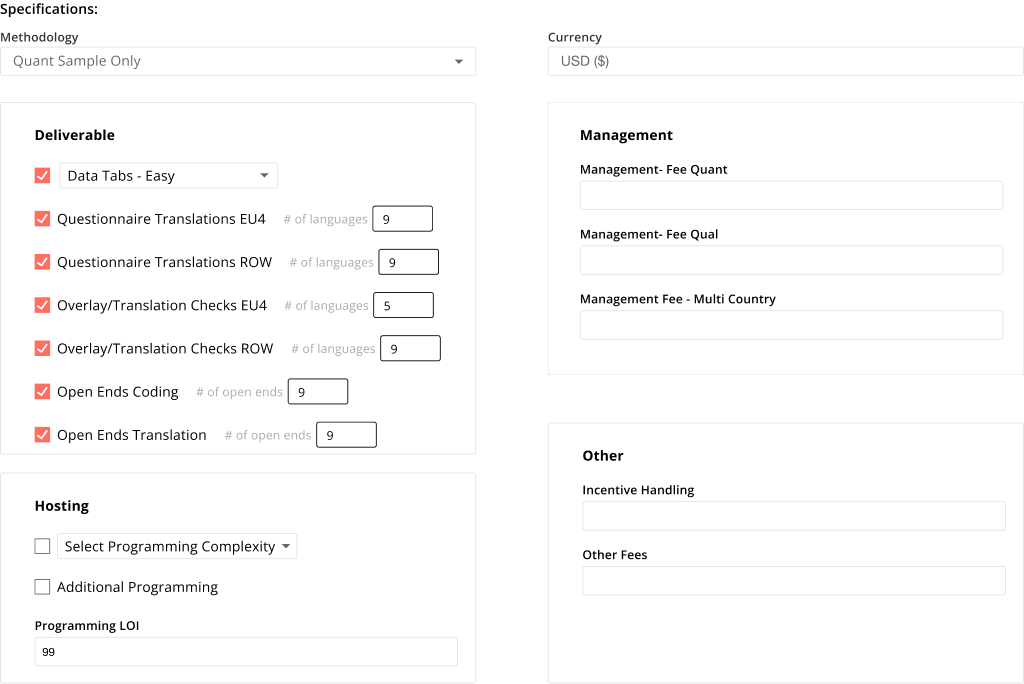
the BidSet methodology, deliverables, hosting, and fees for the project estimate.
- 03
Review
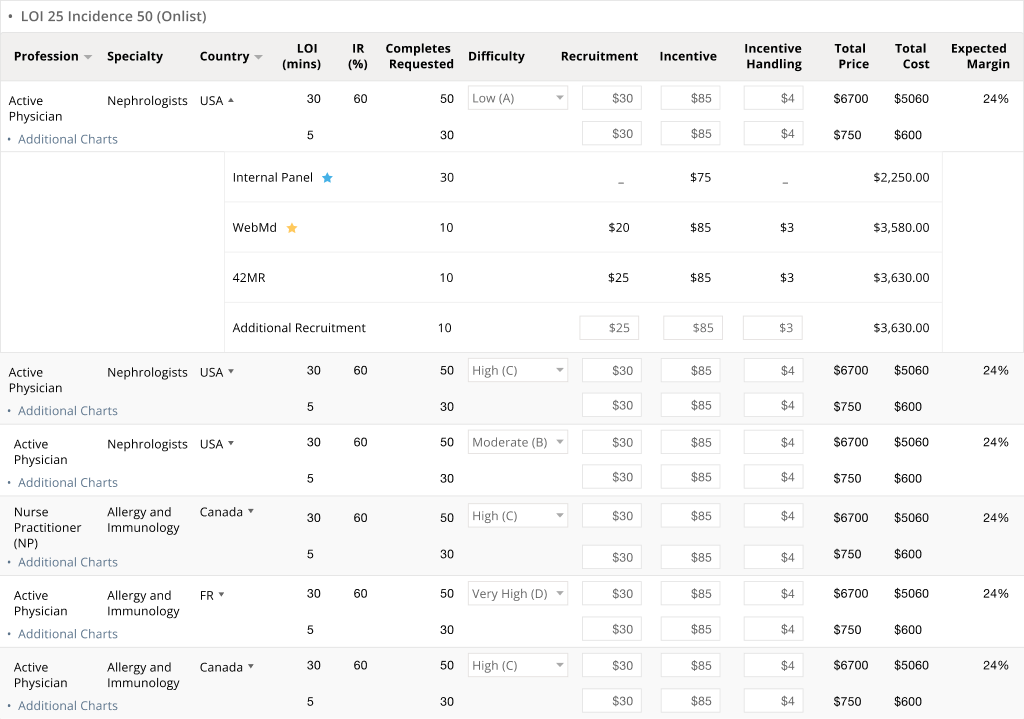
the EstimateReview pricing details, total price, total cost, and expected margin for each option.

A centralized view before the workflow begins
The dashboard gives teams a centralized view of all feasibility requests — status, ownership, and quick navigation. Creating a new request opens a structured input form where users define the project scope before evaluation begins.

Define the project request
Project managers consolidate team inputs into one request: study type, audiences, countries, survey length (LOI), incidence rate, and requested completes. List Match, Chart Survey, and off-list requirements introduce different inputs and specifications. These choices shape downstream calculations and the information shown in the interface.
A clipboard import accelerates intake: users paste structured project information and the system auto-populates audience, geography, and survey parameters.

Review feasibility signals
Project managers review the results for each study option, then inspect panel availability and historical survey performance. This helps them assess viability before moving on to the bid configuration.

Configure the bid
Once feasibility has been assessed, project managers configure methodology, currency, deliverables, hosting, and fees. These specifications provide the inputs for the pricing estimate.
Review the estimate
Project managers inspect audience and supplier pricing details, then review total price, total cost, and expected margin for each option. The summary brings sample pricing, PM fees, and services together for review.

Complex Cases
One workflow.
Many configurations.
A request can combine study types, audiences, countries, and options. Changing the study configuration changes required inputs, calculations, and downstream table structures. Repeated groups keep the results connected to the request that produced them.
The project manager’s path stays consistent: define the request and assess feasibility, configure the bid, then review the estimate.
Keep each scenario in context
A combined study introduces on-list and off-list groups within each option. Consistent columns keep audience, country, requested completes, and feasibility signals comparable.
Make pricing relationships visible
Audience rows connect to additional chart studies and expandable supplier details. Editable recruitment and incentive inputs sit beside price, cost, and expected margin, keeping the breakdown available for review.
Outcome
Spreadsheets out. Shared truth in.
The platform replaced fragmented spreadsheets across three teams with one decision platform used by 20+ internal users. Project managers bring together team inputs to assess feasibility and prepare estimates. Pricing logic became visible, reviewable, and explainable, supporting an estimated 35% faster proposal turnaround.
This is an ongoing engagement: weekly design reviews with three team leads, feedback that prioritizes the next round of improvements, and a ticket-tracked path for issues.

What I Learned
Designing decision-support
is designing for trust.
Designing around the decision-maker. Sales, Operations, and Research contribute different inputs. Organizing those inputs around the project manager’s evaluation path connects the information to the decision it supports.
Keeping related information together. Study choices change parameters and results. Grouped options and nested tables preserve the relationships between audiences, additional charts, and supplier details.
Supporting trust in system outputs. Because pricing and feasibility calculations directly impact client proposals, users needed transparency into how results were generated. Drill-down details and clear feasibility signals helped project managers inspect the evidence behind feasibility and pricing estimates.